
ThemeHigh
  • Plugins
  • Bundles New
    Documentation
    WooCommerce Essential Bundle
    Feature request
    WooCommerce Checkout page Bundle
    Translation project
    WooCommerce Product page Bundle
    WooCommerce Essential Bundle
    WooCommerce Checkout page Bundle
    WooCommerce Product page Bundle
    Build Your Own Bundle (BYOB)

    Best Value

    An essential WooCommerce plugins bundle to boost your performance and sales.

    • Checkout field editor for WooCommerce - $49
    • Extra product option for WooCommerce - $39
    • Email customizer for WooCommerce - $39
    • Multistep checkout for WooCommerce - $39
    • Multiple Shipping address for WooCommerce - $39
    • Variation swatches for WooCommerce - $39
    $244$122 Only
    Know more

    Best Value

    An checkout WooCommerce plugins bundle to boost your performance and sales.

    • Checkout Field Editor for WooCommerce - $49
    • Multistep Checkout for WooCommerce - $39
    • Multiple Shipping Address for WooCommerce - $39
    $127$109 Only
    Know more

    Best Value

    An product WooCommerce plugins bundle to boost your performance and sales.

    • Extra Product Option for WooCommerce - $39
    • Variation Swatches for WooCommerce - $39
    • Email Customizer for WooCommerce - $39
    • Schedule Delivery for WooCommerce - $49
    $166$119 Only
    Know more

    HOT SALE

    Your Money, Your Choice - The Savings Are On Us!

    BYOB Offer

    Get the flexibility to create your perfect plugin bundle! Pick the plugins you need and enjoy an exclusive discount —only pay for what you use!

    $100 - $149: 25% Discount

    $150 - $199: 30% Discount

    $200 - $249: 40% Discount

    Above $250: 50% Discount

    *Min 2 quantity is required to claim this offer.

    Know more
  • Documentation
  • Support
  • Partners
  • Login
  • Getting Started
    • Overview...
    • Add/Edit Custom Sections
    • Add/Edit Custom Fields
    • Add Display Styles
    • Set Tooltip Details
    • Price Fields & Types
    • Set Display Rules for Fields & Sections
    • How to Export/Import Fields & Sections Individually
  • Advanced Settings
    • Add Price Table
    • How to modify add to cart button text?
    • Add a Custom Validation Rule
    • Add a Confirm Field Validator
    • Choose a Layout Style
    • Disable "Enhanced Select(Select 2)" for select fields
    • How to post extra options as URL Parameters?
    • Use the Div tag for displaying fields
    • Backup & Import Settings
    • WPML String Translations...
  • FAQ
    • Frequently Asked Questions...
  • Compatible Plugin & Themes
    • Plugins & Themes...
  • For Developers
    • Hooks & References...

Documentation/Extra Product Option for WooCommerce/Overview

Overview

Last updated on August 28, 2023

WooCommerce Extra Product Options lets you create custom product add-ons and extra fields for your product page. With this plugin, you can add on fields like Text, Radio Buttons, Select, File Uploads, Image Group, Date Picker, Check box, and much more on the product page.

Navigate to the WooCommerce → Extra Product Option to access the plugins settings page.
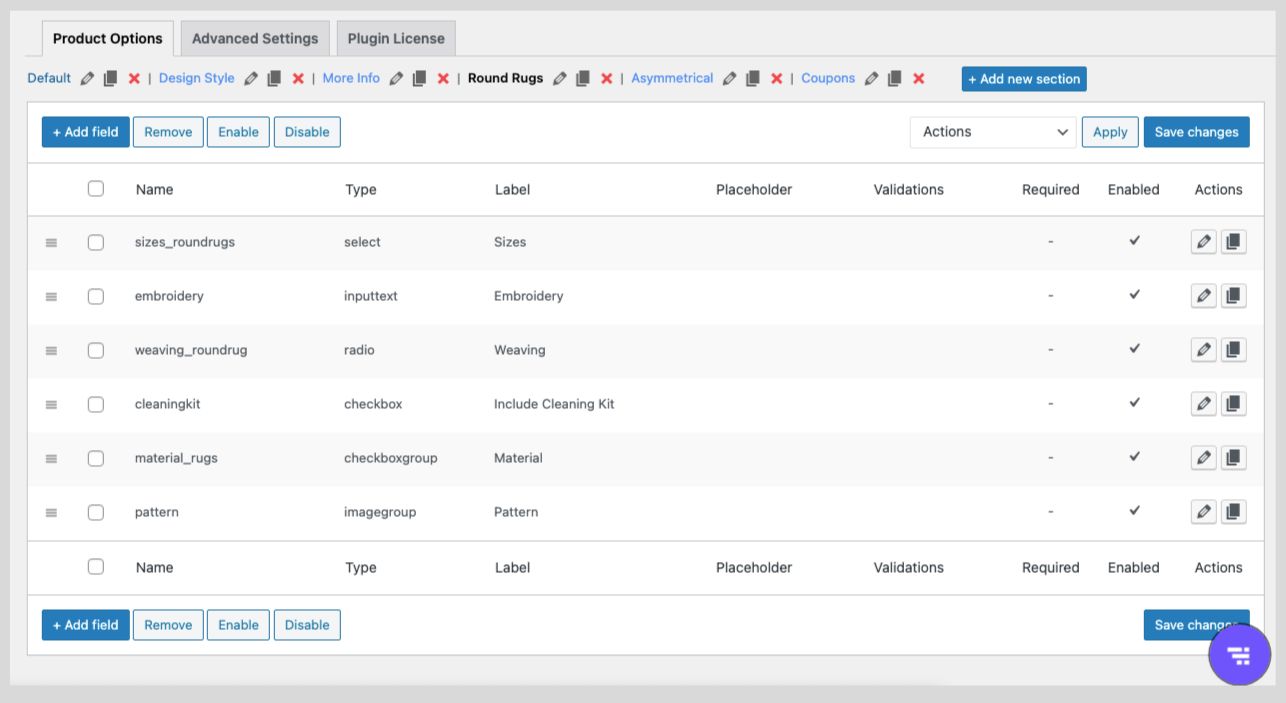

Manage Sections in a Product Page

Sections are a collection of multiple fields assisting you to organize your product page. WooCommerce Extra Product Option comes with only one default section which can be aligned by adding fields based on your product. It also lets you add additional sections apart from the default sections on the product page.

To learn more about sections and their configuration, see Custom Sections.


Manage Fields in a Product Page

WooCommerce Extra Product Options plugin lets you easily customize your product page by adding, editing, deleting, enabling/disabling, and rearranging fields on your product page.

This plugin also provides a lot more features that help you to:

  • Set additional properties to the product fields such as default value, placeholder, max. length etc.
  • Set display styles by choosing title type, title color, title class, title position, etc.
  • Set display rules to show or hide fields based on certain conditions.
  • Set price fields to increase or decrease the product price from the product page based on user inputs.
  • Set custom validations.

To learn more about sections and their configuration, see Custom Fields.


Display Styles

Display styles are the set of properties that can be applied to fields displayed on the product page. It lets you manage the title type, title color, title position, subtitle type, subtitle color, etc. Also, the property can be used for custom styling.

To learn more about display styles, see Display Styles.


Display Rules

Display rules are a set of conditions that can be set for sections and fields to control their display on the product page. Using this option you can easily add conditions to show or hide sections and fields on the product page.

To learn more about display rules and their configuration, see Display Rules.


Price Fields

Use price fields to increase or decrease the price based on the user input on the product page. You can choose from Fixed, Custom, Percentage on product price, Dynamic, and Dynamic – exclude base price based on the user input fields.

To learn more about price fields and their configuration, see Price Fields.


Custom Validations

By setting Custom Validators, you can define your own validation rules based on Regular Expressions. You can create custom validators from advanced settings and select the specific validator from the validation drop-down while creating or editing a product field.

To learn more on custom validators and their configuration, check out Custom Validation


Confirm Validations

Confirm field validators come in handy while there is a particular field that is to be compared with another field to ensure they match. This feature helps to validate two fields for the same value (for example text to be printed on the cup and confirm the text to be printed on the cup) while placing an order. This validation is assigned to any particular field which will be verified and validated before placing the order.

To learn more about confirming validators and their configuration, see Confirm Validators.


Get the plugin

Quick Links

  • Try Demo
  • How to Download and Install Our Plugin ?
  • Manage License
  • Join our Facebook Community

On this page

  • Manage Sections in a Product Page
  • Manage Fields in a Product Page
  • Display Styles
  • Display Rules
  • Price Fields
  • Custom Validations
  • Confirm Validations

This article posted in Extra Product Option for WooCommerce, Getting Started, Pro Documentation

Leave a Reply Cancel reply

Your email address will not be published. Required fields are marked *

ThemeHigh

We develop innovative WordPress plugins and themes for e-commerce and other WordPress websites.

Resources
  • Documentation
  • Support
  • Blog
  • Bestsellers
  • Affiliates
  • Partners
Policy Information
  • Terms & Conditions
  • Privacy Policy
  • Support Policy
  • Refunds Policy
  • Licenses
Security
Payment Options

© 2025 ThemeHigh. All rights reserved.

Terms and conditions, features, support, pricing, and service options subject to change without notice.