
ThemeHigh
  • Plugins
  • Documentation
  • Support
  • Partners
  • Login
  • Getting Started
    • Overview...
    • Add/Edit Custom Sections
    • Add/Edit Custom Fields
    • Add Display Styles
    • Set Tooltip Details
    • Price Fields & Types
    • Set Display Rules for Fields & Sections
    • How to Export/Import Fields & Sections Individually
  • Advanced Settings
    • Add Price Table
    • How to modify add to cart button text?
    • Add a Custom Validation Rule
    • Add a Confirm Field Validator
    • Choose a Layout Style
    • Disable "Enhanced Select(Select 2)" for select fields
    • How to post extra options as URL Parameters?
    • Use the Div tag for displaying fields
    • Backup & Import Settings
    • WPML String Translations...
  • FAQ
    • Frequently Asked Questions...
  • For Developers
    • Hooks & References...
  • Compatible Plugin & Themes
    • Plugins & Themes...

Documentation/Extra Product Option for WooCommerce/How to Use the Div tag for displaying fields?

How to Use the Div tag for displaying fields?

Last updated on August 30, 2023

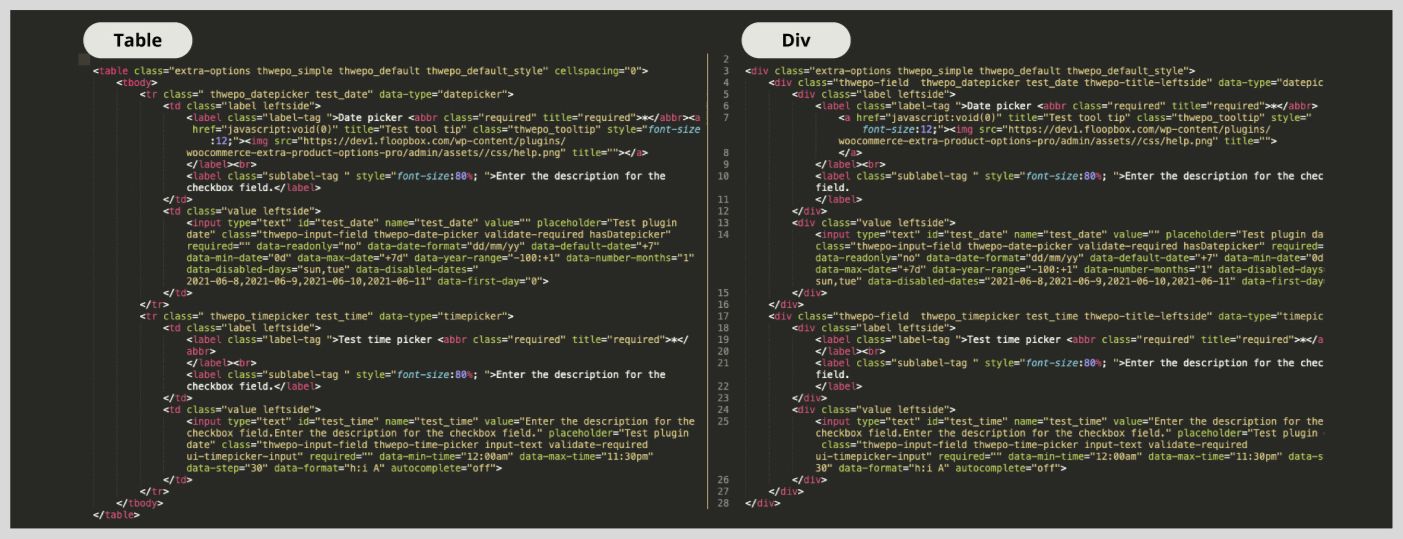
In default, the Extra Options for WooCommerce plugin displays the fields using the Table HTML tag <table>, where the styling options are limited due to table structure. Selecting the Use Div tag for displaying fields option lets you display the fields using the Div HTML tag <div>, which is more flexible to work and makes the customization much easier.

div_tag.png

You can check out from the below image how the “Div tag for Display Field” works and have a clear understanding of the difference between “Table” and “Div”.
Quick Links

  • Try Demo
  • How to Download and Install Our Plugin ?
  • Manage License
  • Join our Facebook Community

This article posted in Advanced Settings, Extra Product Option for WooCommerce, Pro Documentation

Leave a Reply Cancel reply

Your email address will not be published. Required fields are marked *

ThemeHigh

We develop innovative WordPress plugins and themes for e-commerce and other WordPress websites.

Resources
  • Documentation
  • Support
  • Blog
  • Bestsellers
  • Affiliates
  • Partners
Policy Information
  • Terms & Conditions
  • Privacy Policy
  • Support Policy
  • Refunds Policy
  • Licenses
Security
Payment Options

© 2026 ThemeHigh. All rights reserved.

Terms and conditions, features, support, pricing, and service options subject to change without notice.