
ThemeHigh
  • Plugins
  • Documentation
  • Support
  • Partners
  • Login
  • Getting Started
    • Accessing your Account Dashboard...
    • Download And Install Your Plugin...
    • Manage License...
    • License Upgrade & License E...
    • Cancel Auto-Renewal...
  • Frequently Asked Questions
    • Frequently Asked Questions...

Documentation/General Guides/Cancel Auto-Renewal

Cancel Auto-Renewal

Last updated on February 24, 2026

The plugin license gets auto-renewed on reaching expiration. If you want to change the auto-renewal setting, you can do so by following these steps:

  1. Click on the My Account menu in the menu bar from the ThemeHigh website (www.themehigh.com)
  2. From the dashboard go to the Subscriptions tab. Here you can view all the subscription and their details.
  3. Click on the cancel button under the Action tab, to get auto-renewal cancelled.
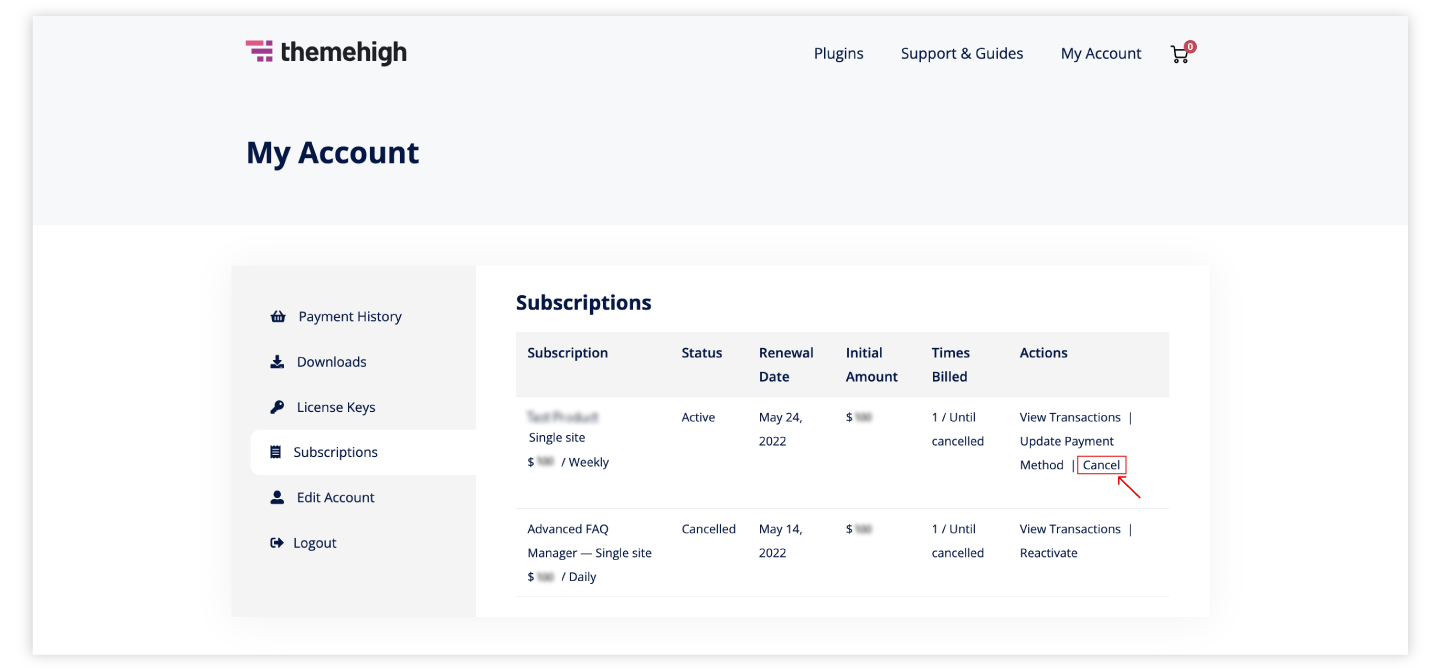
Cancel_subscription.png

This article posted in General Guides, Getting Started, Pro Documentation

Leave a Reply Cancel reply

Your email address will not be published. Required fields are marked *

ThemeHigh

We develop innovative WordPress plugins and themes for e-commerce and other WordPress websites.

Resources
  • Documentation
  • Support
  • Blog
  • Bestsellers
  • Affiliates
  • Partners
Policy Information
  • Terms & Conditions
  • Privacy Policy
  • Support Policy
  • Refunds Policy
  • Licenses
Security
Payment Options

© 2026 ThemeHigh. All rights reserved.

Terms and conditions, features, support, pricing, and service options subject to change without notice.