ThemeHigh
  • Plugins
  • Documentation
  • Support
  • Partners
  • Login
  • Getting Started
    • Plugin Installation
    • Overview
    • Managing Checkout Fields
    • Set Display Rules
    • Set Repeat Rules
    • Price Fields & Types
    • User Meta Fields
    • Time Picker Settings
    • Why Your Checkout Fields Aren’...
    • Date Picker Settings
    • Display Custom Fields...
  • Advanced Settings
    • Include New Fields in Address Format?
    • Enable Address Autofill
    • Configure Locale Override Settings
    • Add Custom Fields to CSV Export
    • Display Custom Fields In PDF Invoices & Packing Slips
    • Zapier Support
    • Display Country & State Fields based on Conditional Rules
    • WPML Compatibility
    • Where do the Custom Fields get Saved or Displayed?
    • Backup & Import Settings
    • Enable Inline Validation...
    • WPML String Translations...
    • Custom Fields in WooCommerce Orders
    • Add a New Custom Validation Rule
    • Add a New Confirm Field Validator
    • Import/Export the Checkout Fields and Sections
  • For Developers
    • Hooks & References...
    • Display Rules: Use cases and mor...
    • Repeat Rules: More use cases and...
    • Based on Checkout Fields: Use ca...
    • Override HTML Content: Examples...
    • Compatibility with “WooCom...
  • Frequently Asked Questions
    • Frequently Asked Questions...
  • Compatible Plugin & Themes
    • Plugins & Themes...
  • How
    • How To Display Fields In Order D...
    • How To Customise The Shipping Se...
    • How To Add Custom Fields In The ...
    • How to Add Custom Price Fields o...
    • How To Add A New Section To The ...
    • How To Display Custom Fields In ...
    • How to Show/Hide Fields Based On...
    • How To Set Repeat Rules On The C...

Documentation/Checkout Field Editor for WooCommerce/Overview

Overview

Last updated on May 15, 2026

Checkout Field Editor for WooCommerce is a checkout field customization plugin that gives you full control over how your checkout fields works. It allows you to add, edit, duplicate, delete, and rearrange checkout fields and sections without touching code, helping you create a checkout experience that fits your store’s workflow and customer needs.

The plugin is compatible with both the Classic Checkout Editor and the modern Block Checkout in WooCommerce, enabling you to manage checkout fields regardless of the checkout experience your store uses.

Checkout field behavior and configuration options differ between Classic Checkout and Block Checkout. It is important to follow the documentation specific to the checkout layout enabled in your store and make changes using the corresponding editor.

This documentation primarily explains features and configurations with reference to the Classic Checkout Editor. If your store is using the Block layout, please refer to the Block Checkout Editor documentation for accurate guidance.

Overview B

Front-end View
Overview F

What does the Checkout Field Editor for WooCommerce do?

By default, WooCommerce provides a predefined set of checkout fields with limited customization options. This plugin extends those capabilities by offering a flexible interface to manage fields and sections directly from your dashboard.

With Checkout Field Editor for WooCommerce, you can:

  • Create new custom fields
  • Modify existing checkout fields
  • Apply conditional rules for display
  • Set field with pricing details
  • Repeat fields and sections with certain rules
  • Organize sections for better clarity and usability

Why use Checkout Field Editor instead of the default checkout?

The standard WooCommerce checkout is designed for general store setups and may not cover advanced business requirements. Adding extra fields or changing field behavior often requires custom code or developer assistance.

Checkout Field Editor Plugin simplifies this process by providing a visual interface where fields can be configured quickly without technical complexity.

Whether you need to collect additional information, simplify the checkout process, or personalize the experience, the plugin makes checkout customization more structured and efficient. It helps you adapt the checkout flow while maintaining a clean and user-friendly ordering experience.

Manage Sections in the Checkout Page

Sections are collections of related fields that help you to organize your fields on the checkout page. Out of the box, WooCommerce has three sections Billing, Shipping and Additional Details on the checkout form. The Checkout Field Editor plugin lets you add additional sections apart from the default sections to the checkout page.

To learn more about managing sections, see Managing Sections.

Manage Checkout Fields in the Checkout Page

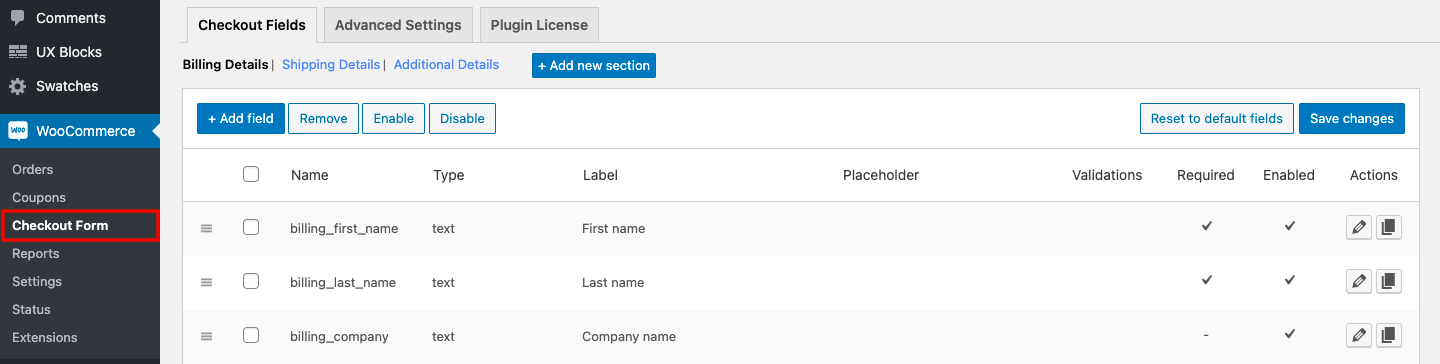
Checkout Field Editor for WooCommerce plugin lets you easily add, edit, delete and rearrange fields on your checkout page using 24 custom field types.

This plugin also provides a lot more features which help you to,

  • Set additional properties to the checkout fields such as default value, placeholder, max. length etc.
  • Set display rules to show or hide fields based on certain conditions.
  • Set repeat rules to repeat fields based on product quantity and cart count.
  • Set price fields to add an extra fee to the order total based on the field value.
  • Set custom validations.

To learn more about managing checkout fields, see Managing Checkout fields.


Display Rules

Display Rules allow you to control when and where sections or fields appear on the checkout page. By configuring specific conditions, you can choose to show or hide fields and sections dynamically based on predefined criteria.

You can show/hide fields based on these rules:

  1. Based on Cart, User Roles, and Products
  2. Based on Checkout Fields

To learn more about display rules and their configuration, see Set Display rules.

Repeat Rules

Repeat Rules are the feature useful when you want to repeat a field or section based on a certain property of the checkout page. The property value will be used to determine how many times the section or field should be repeated. 

You can repeat section & fields based on:

  • Product quantity
  • Cart count

To learn more about repeat rules and their configuration, see Set Repeat Rules.

Price Fields & Types

Price Fields allow you to add an additional charge to the order total based on the value selected or entered in a checkout field. This feature is useful for collecting extra fees for optional services, add-ons, or custom requests during checkout.

The plugin supports multiple pricing types, including

  • Fixed Price
  • Custom Price
  • Percentage of Cart Contents Total
  • Percentage of Subtotal
  • Percentage of Subtotal (Excl. Tax)
  • Dynamic Price

To learn more about how to configure these pricing options, see Set Price Fields.

These features work together to give you full control with customization over your checkout experience. Use the links above to learn more about any specific feature.


Get the plugin

On this page

  • What does the Checkout Field Editor for WooCommerce do?
  • Why use Checkout Field Editor instead of the default checkout?
  • Manage Sections in the Checkout Page
  • Manage Checkout Fields in the Checkout Page
  • Display Rules
  • Repeat Rules
  • Price Fields & Types

What's new

  • Added a custom file upload button property for the File upload field type.
  • Alert on selecting display position of sections as before/after terms and conditions.
  • Added Woocommerce 6.8.2 compatibility.

Highlights

  • 24 custom field types with file upload.
  • Create additional sections.
  • Display sections and Fields Conditionally.
  • Display custom fields at 14 different positions.
  • Create confirm field validators.
  • Price fields with a set of price types.
  • Repeat fields and sections based on specific conditions.
  • WPML Compatibility.
  • Import & Export fields and sections.

This article posted in Checkout Field Editor for WooCommerce, Getting Started, Pro Documentation

Leave a Reply Cancel reply

Your email address will not be published. Required fields are marked *

ThemeHigh

We develop innovative WordPress plugins and themes for e-commerce and other WordPress websites.

Resources
  • Documentation
  • Support
  • Blog
  • Bestsellers
  • Affiliates
  • Partners
Policy Information
  • Terms & Conditions
  • Privacy Policy
  • Support Policy
  • Refunds Policy
  • Licenses
Security
Payment Options

© 2026 ThemeHigh. All rights reserved.

Terms and conditions, features, support, pricing, and service options subject to change without notice.